Choosing a course abroad usually means 30 browser tabs, conflicting advice and a lot of guesswork. This guide explains how coursefind.app works, step by step, so you know exactly what to expect before you run your first search.
Quick answer: The platform at coursefind.app is a free course discovery tool for international students and parents. You search a subject or country, filter results, compare course details, then confirm everything with the university before applying.
Why Searching for Courses Abroad Feels So Hard
Every university publishes its course details in its own format. Fees sit on one page, entry requirements on another, and intake dates somewhere else. Multiply that by five universities in three countries and the research becomes exhausting.
That is the gap this platform tries to close: one place to start, so you can explore before you dive into individual university websites.
How coursefind.app Works: The Basics
On coursefind.app, courses from many universities sit in one search. Listings are sourced from official university websites, and searching is free. The platform is built for both students and parents, so families can explore options together.
You can search across 16 destinations, including the UK, Australia, Canada, Germany, Ireland, Italy, the UAE and the USA. The site also offers country guides, subject pages and a scholarships guide to support your research.
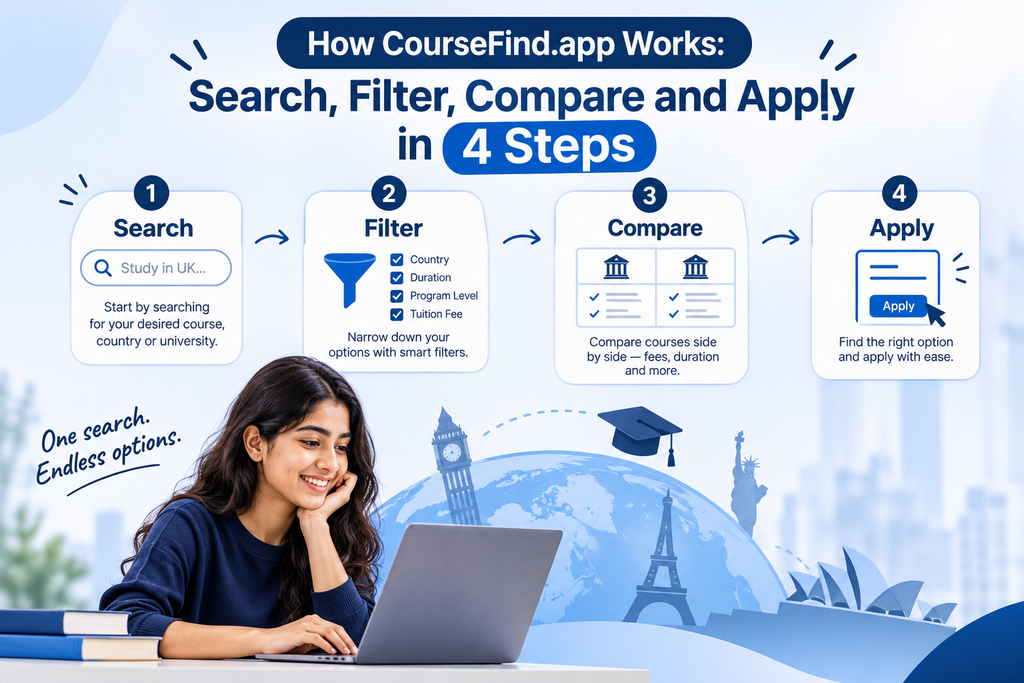
Step 1: Search by Subject, Course or Country
Open the coursefind.app course search and type what you would love to study. It can be a broad subject, such as nursing, or a specific course you already have in mind. Then pick a country, or leave it on “Anywhere” to see options across destinations.
Not sure where to start? Use the quick searches for Business and MBA, Nursing, Data Science or Engineering. You can also browse by subject area or read a study destination guide before searching.
Tip: Start broad. A narrow search can hide courses with slightly different names.
Step 2: Filter Your Results
Once results appear, narrow them by country, university and programme level. This keeps a broad search manageable and stops you from comparing courses that were never a fit.
A good filtering habit is to choose the level first (undergraduate, postgraduate or foundation) and then add the country. Level matters because entry requirements and visa rules differ. For example, the UK government explains that a Student visa requires an offer from a licensed sponsor, so your course and university choice come before any visa step.
Tip: Save time by filtering for one country at a time, then repeat the search for your second choice.
Step 3: Compare Courses Before You Decide
Open the listings that interest you and note the details side by side: tuition fees, entry requirements, intakes and scholarships. A simple shortlist table keeps everything in one view. Copy this template into a notes app or spreadsheet:
| Check | Course A | Course B | Course C |
|---|---|---|---|
| Country and university | |||
| Tuition fee | |||
| Entry requirements | |||
| Intake month | |||
| Scholarship options |
Comparing three to five courses is usually enough. Funding can change the picture completely, so read our international scholarships guide before you narrow down.
Step 4: Verify With the University, Then Apply
This is the most important step in how coursefind.app works. The platform helps you find and shortlist courses, but fees, deadlines and entry rules can change. Always confirm the latest details on the university’s official page before you apply.
Universities publish their own fee and funding pages, such as the University of Exeter’s funding and scholarships page. Government-backed resources are also useful for checking rules, including Study Australia, EducationUSA and the DAAD for Germany. Once everything checks out, apply directly through the university.
A Quick Example: Master’s in Data Science in Germany
Here is how the four steps look in practice.
- Search: Type “Data Science” and select Germany.
- Filter: Choose postgraduate level and note the universities that appear.
- Compare: Shortlist three courses and record fees, entry requirements and intake dates in your table.
- Verify: Open each university’s official page, confirm the details, check the DAAD site for funding, and apply.
Before you start, read our Study in Germany guide for the basics.
Common Mistakes to Avoid
- Relying on one source. Always cross-check with the university.
- Ignoring intake dates. A great course is useless if the deadline has passed.
- Skipping funding research. Scholarships often have earlier deadlines than admissions.
- Comparing too many courses. Ten options create confusion. Aim for a short list.
Who Should Use coursefind.app?
- Students who want to explore courses without a sales pitch.
- Parents who want to research options and costs alongside their child.
- Career changers comparing subjects across several countries.
If you already have a country in mind, start with Study in the United Kingdom or another destination guide.
FAQs About How coursefind.app Works
Is coursefind.app free?
Yes. Searching courses on coursefind.app is free for students.
Where does coursefind.app get its course data?
Course data is sourced from official university websites.
Does coursefind.app submit my application?
No. You review the course details and then apply through the university itself.
Can parents use it too?
Yes. The platform is built for students and parents to explore courses together.
Start Exploring
Now you know how coursefind.app works: search, filter, compare, then verify and apply. Try it with one subject and one country, and build a shortlist in 10 minutes. Search courses free on coursefind.app.